ReactJS

React ເປັນ JavaScript library ທີ່ຊ່ວຍໃຫ້ການພັດທະນາເວັບໄຊທ໌ງ່າຍຂຶ້ນ. React ຍັງຊ່ວຍໃຫ້ສ້າງສິ່ງທີ່ຊ້ຳກັນເປັນອັນດຽວ ແລ້ວນຳໄປໃຊ້ໄດ້ຫຼາຍຄັ້ງ ເຊິ່ງເອີ້ນວ່າ component. ເຮັດໃຫ້ Source Code ຂອງເຮົາເປັນລະບຽບ ແລະ ບຳລຸງຮັກສາໄດ້ໃນໄລຍະຍາວ.
ການເຊື່ອມຕໍ່ Payment ດ້ວຍ ReactJS
ທ່ານສາມາດນຳໃຊ້ ReactJS ເພື່ອເຊື່ອມຕໍ່ກັບ PhaJay Payment Support ຂອງພວກເຮົາ. ກ່ອນອື່ນໝົດ ເຮົາຕ້ອງສ້າງໂປຣເຈັກ ReactJS. ໂປຣເຈັກນີ້ຈະເປັນລະບົບ e-Commerce ໂດຍສະເພາະໜ້າລາຍລະອຽດສິນຄ້າ ທີ່ຈະສະແດງຮູບພາບ, ລາຍລະອຽດ, ລາຄາ, ປະເພດ ແລະ ອື່ນໆ. ນອກຈາກນີ້ ຍັງມີການສັ່ງຊື້ ເຊິ່ງຈະສົ່ງຄຳສັ່ງໄປສ້າງ QR Payment ຢູ່ທະນາຄານການຄ້າ ແລະ ສາມາດໃຊ້ແອັບທະນາຄານການຄ້າ (BCEL One) ສະແກນເພື່ອຊຳລະ. ຫຼັງຈາກນັ້ນ ລະບົບຈະໄດ້ຮັບ Callback ຈາກທະນາຄານ ທີ່ມີລາຍລະອຽດຂອງການຊຳລະນັ້ນ ແລະ ເຮົາຈະສະແດງຂໍ້ຄວາມຢືນຢັນການຊຳລະ. Source Code ທັງໝົດສາມາດເບິ່ງໄດ້ທີ່ລິ້ງນີ້ Github (opens in a new tab)
ຖ້າຕ້ອງການອ່ານລາຍລະອຽດເພີ່ມເຕີມກ່ຽວກັບ PhaJay Payment Support ສາມາດເບິ່ງໄດ້ທີ່ນີ້ Introduction
ສ້າງ React App
Create React App ເປັນສະພາບແວດລ້ອມທີ່ສະດວກສຳລັບການຮຽນຮູ້ React ເຊິ່ງລາຍລະອຽດເພີ່ມເຕີມສາມາດເບິ່ງໄດ້ທີ່ ຄູ່ມືການນຳໃຊ້ React (opens in a new tab) ແລະ ເປັນວິທີທີ່ດີທີ່ສຸດເພື່ອເລີ່ມຕົ້ນສ້າງແອັບພລິເຄຊັນໜ້າດຽວ (single page application) ໃໝ່ດ້ວຍ React.
ມັນຕັ້ງຄ່າສະພາບແວດລ້ອມການພັດທະນາຂອງທ່ານ ເພື່ອໃຫ້ທ່ານສາມາດໃຊ້ຄຸນສົມບັດ JavaScript ຫຼ້າສຸດ, ໃຫ້ປະສົບການທີ່ດີແກ່ນັກພັດທະນາ, ແລະ ເພີ່ມປະສິດທິພາບຂອງແອັບສຳລັບ production. ທ່ານຕ້ອງມີ Node >= 14.0.0 ແລະ npm >= 5.6 ໃນເຄື່ອງຂອງທ່ານ. ເພື່ອສ້າງໂປຣເຈັກ ໃຫ້ແລ່ນ:
npx create-react-app lailaopayment-reactjs
cd lailaopayment-reactjs
npm start
ມາອະທິບາຍຄຳສັ່ງຂ້າງເທິງນຳກັນ
ແຖວທີ 1 ຄຳສັ່ງນີ້ຈະສ້າງໂປຣເຈັກ ReactJS ຊື່ lailaopayment-reactjs
ແຖວທີ 2 ແມ່ນການເຂົ້າໄປຍັງໂຟນເດີ lailaopayment-reactjs
ແຖວທີ 3 ຄຳສັ່ງເພື່ອແລ່ນໂປຣເຈັກໃນໂໝດ Debug ເປັນຄັ້ງທຳອິດ ຫຼັງຈາກນັ້ນເຮົາສາມາດເຂົ້າ browser ທີ່ url: http://localhost:3000/ (opens in a new tab)
ຕໍ່ໄປເຮົາສາມາດເພີ່ມ Library ຕ່າງໆ ເຊັ່ນ icon, ການສະແດງຮູບພາບ, ການໃຫ້ດາວ ແລະ tailwind ເພື່ອຊ່ວຍອອກແບບໜ້າຕາໃຫ້ສວຍງາມຂຶ້ນ ໂດຍພິມຄຳສັ່ງລຸ່ມນີ້:
npm install react-icons react-image-gallery react-rater tailwindcss @headlessui/react react-qrcode-logoຄຳສັ່ງຂ້າງເທິງແມ່ນການເພີ່ມ Library ຕ່າງໆລົງໃນໂປຣເຈັກ ເຊິ່ງແຕ່ລະອັນມີຄວາມໝາຍດັ່ງລຸ່ມນີ້:
| Library | ລາຍລະອຽດ |
|---|---|
| react-icons | Library ທີ່ໃຫ້ icon ສຳລັບໃຊ້ໃນໂປຣເຈັກ ReactJS |
| react-image-gallery | Library ກຣາຟິກຂອງ React ເປັນ React component ສຳລັບສ້າງ image gallery ແລະ carousel |
| react-rater | Library ທີ່ໃຫ້ການໃຫ້ຄະແນນດາວຂອງສິນຄ້າ ສຳລັບໃຊ້ໃນໂປຣເຈັກ ReactJS |
| tailwindcss | Library ທີ່ໃຫ້ເຄື່ອງມືຊ່ວຍອອກແບບທີ່ສວຍງາມ, component ແລະ template ທີ່ອອກແບບມາຢ່າງດີ |
| @headlessui/react | Library ທີ່ໃຫ້ຊຸດ UI element ທີ່ໃຊ້ໄດ້ຟຣີ ແລະ ເຂົ້າເຖິງໄດ້ເຕັມຮູບແບບ (accessible) ສຳລັບ React ອອກແບບມາໃຫ້ເຂົ້າກັບ Tailwind CSS ໄດ້ດີ |
| react-qrcode-logo | Library ທີ່ໃຫ້ການສະແດງ QR Code ໃນລະບົບ ພ້ອມທັງສະແດງຮູບພາບຢູ່ເຄິ່ງກາງ |
ເພື່ອຈຳລອງໜ້າລາຍລະອຽດສິນຄ້າ ທ່ານສາມາດໃຊ້ source code ລຸ່ມນີ້ ເຮົາຈະໄດ້ຮູບພາບສິນຄ້າ ແລະ ລາຍລະອຽດສິນຄ້າສະແດງຢູ່ທາງດ້ານຂວາ.
import "./App.css";
import { BiCollapse, BiShoppingBag } from "react-icons/bi";
import ReactImageGallery from "react-image-gallery";
import Rater from "react-rater";
import "react-rater/lib/react-rater.css";
import { Fragment, useEffect, useRef, useState } from "react";
import { Dialog, Transition } from "@headlessui/react";
import axios from "axios";
import { QRCode } from "react-qrcode-logo";
import { io } from "socket.io-client";

const App = () => {
  const socket = io("https://payment-gateway.phajay.co", { transports: ["websocket"] });

  const [open, setOpen] = useState(false);
  const [openComplete, setOpenComplete] = useState(false);
  const [isLoading, setIsLoading] = useState(false);
  const [bcelData, setBcelData] = useState();
  const [bcelCallbackData, setBcelCallbackData] = useState();
  const cancelButtonRef = useRef(null);

  useEffect(() => {
    function onConnect() {
      console.log("CONNECTED");
    }

    function onDisconnect() {
      console.log("DISCONNECTED");
    }

    function onSubscribeBCELEvent(value) {
      setOpen(false);
      console.log(value);
      setBcelCallbackData(value);
      setTimeout(() => {
        setOpenComplete(true);
      }, 500);
    }

    socket.on("connect", onConnect);
    socket.on("disconnect", onDisconnect);
    socket.on(`join::$2b$10$Ek7DpQ3IZW70CGvzKDmvquZllTxwn3Hdxi/GL9lPzDxaNYHeSPdg.`, onSubscribeBCELEvent);

    return () => {
      socket.off("connect", onConnect);
      socket.off("disconnect", onDisconnect);
      socket.off(`join:$2b$10$Ek7DpQ3IZW70CGvzKDmvquZllTxwn3Hdxi/GL9lPzDxaNYHeSPdg.`, onSubscribeBCELEvent);
    };
  }, []);

  const productDetailItem = {
    images: [
      {
        original: "https://images.pexels.com/photos/90946/pexels-photo-90946.jpeg?auto=compress&cs=tinysrgb&w=600",
        thumbnail: "https://images.pexels.com/photos/90946/pexels-photo-90946.jpeg?auto=compress&cs=tinysrgb&w=600",
      },
      {
        original: "https://ph.canon/media/image/2023/05/19/b89bed4e21e540f985dedebe80166def_EOS+R100+RF-S18-45mm+Front+Slant.png",
        thumbnail: "https://ph.canon/media/image/2023/05/19/b89bed4e21e540f985dedebe80166def_EOS+R100+RF-S18-45mm+Front+Slant.png",
      },
      {
        original:
          "https://encrypted-tbn0.gstatic.com/images?q=tbn:ANd9GcSM2_tsZUuInzUC7Zb6j47i-pSUsNK3Np10X3l62d15mDnFgWrmuv-M0SZ8zuEovF0CeGI&usqp=CAU",
        thumbnail:
          "https://encrypted-tbn0.gstatic.com/images?q=tbn:ANd9GcSM2_tsZUuInzUC7Zb6j47i-pSUsNK3Np10X3l62d15mDnFgWrmuv-M0SZ8zuEovF0CeGI&usqp=CAU",
      },
      {
        original: "https://s3-ap-southeast-1.amazonaws.com/media.cameralk.com/486/conversions/1561852319_1274706-thumb.jpg",
        thumbnail: "https://s3-ap-southeast-1.amazonaws.com/media.cameralk.com/486/conversions/1561852319_1274706-thumb.jpg",
      },
      {
        original:
          "https://encrypted-tbn0.gstatic.com/images?q=tbn:ANd9GcT4lVOONL9MpQzp34tnFcQcqBBT15fA-maaCg6xgNIOCPem-xxtSBKx6ISdd4jEfuCTid8&usqp=CAU",
        thumbnail:
          "https://encrypted-tbn0.gstatic.com/images?q=tbn:ANd9GcT4lVOONL9MpQzp34tnFcQcqBBT15fA-maaCg6xgNIOCPem-xxtSBKx6ISdd4jEfuCTid8&usqp=CAU",
      },
    ],
    title: "ກ້ອງຖ່າຍຮູບ ສາຍຂອງ",
    reviews: "150",
    availability: true,
    brand: "ລາວສ້າງພາບ",
    category: "ກ້ອງຖ່າຍຮູບ",
    sku: "BE45VGTRK",
    price: 450000,
    previousPrice: 599000,
    description:
      "ຂໍອະນຸຍາດຜູ່ດູແລກຸ່ມ🙂 ຂາຍເລນກ້ອງຖ່າຍຮູບ ⏩   ເລນ Canon EF50mm f:1.4 STM ⏩   ໃຊ້ໄດ້ກັບກ້ອງ DSLR ທັງ FULL FRAME ແລະ APS-C  Filter Hoya Pro1 Digital mc uv(0)",
    size: ["XS", "S", "M", "L", "XL"],
    color: ["gray", "violet", "red"],
  };
  const plusMinuceButton =
    "flex h-8 w-8 cursor-pointer items-center justify-center border duration-100 hover:bg-neutral-100 focus:ring-2 focus:ring-gray-500 active:ring-2 active:ring-gray-500";

  const sendForRequestQr = async () => {
    setIsLoading(true);
    let data = {
      amount: "1",
      description: "payment-Support-test",
    };

    let config = {
      method: "post",
      maxBodyLength: Infinity,
      url: "https://payment-gateway.phajay.co/v1/api/payment/generate-bcel-qr",
      headers: {
        secretKey: "Key_test", // ເມື່ອສ້າງບັນຊີສຳເລັດ ທ່ານຈະເຫັນ Key_Test
        "Content-Type": "application/x-www-form-urlencoded",
      },
      data: data,
    };

    axios
      .request(config)
      .then((response) => {
        console.log(JSON.stringify(response.data));
        setBcelData(response.data);
        setIsLoading(false);
      })
      .catch((error) => {
        console.log(error);
        setIsLoading(false);
      });
  };

  return (
    <section className="container flex-grow mx-auto max-w-[1200px] border-b py-5 lg:grid lg:grid-cols-2 lg:py-10">
      {/* image gallery */}
      <div className="container mx-auto px-4">
        <ReactImageGallery showBullets={false} showFullscreenButton={false} showPlayButton={false} items={productDetailItem.images} />

        {/* /image gallery  */}
      </div>
      {/* description  */}

      <div className="mx-auto px-5 lg:px-5">
        <h2 className="pt-3 text-2xl font-bold lg:pt-0">{productDetailItem.title}</h2>
        <div className="mt-1">
          <div className="flex items-center">
            <Rater style={{ fontSize: "20px" }} total={5} interactive={false} rating={3.5} />

            <p className="ml-3 text-sm text-gray-400">({productDetailItem.reviews})</p>
          </div>
        </div>
        <p className="mt-5 font-bold">
          ຈຳນວນເຫລືອ:{" "}
          {productDetailItem.availability ? <span className="text-green-600">ໃນສະຕ໊ອກ </span> : <span className="text-red-600">ຫມົດ</span>}
        </p>
        <p className="font-bold">
          ແບລນ: <span className="font-normal">{productDetailItem.brand}</span>
        </p>
        <p className="font-bold">
          ຫມວດ: <span className="font-normal">{productDetailItem.category}</span>
        </p>
        <p className="font-bold">
          SKU: <span className="font-normal">{productDetailItem.sku}</span>
        </p>
        <p className="mt-4 text-4xl font-bold text-violet-900">
          ${productDetailItem.price} <span className="text-xs text-gray-400 line-through">${productDetailItem.previousPrice}</span>
        </p>
        <p className="pt-5 text-sm leading-5 text-gray-500">{productDetailItem.description}</p>
        <div className="mt-6">
          <p className="pb-2 text-xs text-gray-500">ຂະຫນາດ</p>
          <div className="flex gap-1">
            {productDetailItem.size.map((x, index) => {
              return (
                <div
                  key={index}
                  className="flex h-8 w-8 cursor-pointer items-center justify-center border duration-100 hover:bg-neutral-100 focus:ring-2 focus:ring-gray-500 active:ring-2 active:ring-gray-500"
                >
                  {x}
                </div>
              );
            })}
          </div>
        </div>
        <div className="mt-6">
          <p className="pb-2 text-xs text-gray-500">ສີ</p>
          <div className="flex gap-1">
            {productDetailItem.color.map((x, index) => {
              return (
                <div
                  key={index}
                  className={`h-8 w-8 cursor-pointer border border-white bg-${x}-600 focus:ring-2 focus:ring-${x}-500 active:ring-2 active:ring-${x}-500`}
                />
              );
            })}
          </div>
        </div>
        <div className="mt-6">
          <p className="pb-2 text-xs text-gray-500">ຈຳນວນ</p>
          <div className="flex">
            <button className={`${plusMinuceButton}`}>−</button>
            <div className="flex h-8 w-8 cursor-text items-center justify-center border-t border-b active:ring-gray-500">1</div>
            <button className={`${plusMinuceButton}`}> +</button>
          </div>
        </div>
        <div className="mt-7 flex flex-row items-center gap-6">
          <button
            className="flex h-12 w-1/3 items-center justify-center bg-violet-900 text-white duration-100 hover:bg-blue-800"
            onClick={() => {
              sendForRequestQr();
              setOpen(true);
            }}
          >
            <BiShoppingBag className="mx-2" />
            ສັ່ງເລີຍ
          </button>
          {/* <button className="flex h-12 w-1/3 items-center justify-center bg-amber-400 duration-100 hover:bg-yellow-300" onClick={()=>setOpen(true)}>
            <AiOutlineHeart className="mx-2" />
            ສັ່ງເລີຍ
          </button> */}
        </div>
      </div>

      <Transition.Root show={open} as={Fragment}>
        <Dialog as="div" className="relative z-10" initialFocus={cancelButtonRef} onClose={setOpen}>
          <Transition.Child
            as={Fragment}
            enter="ease-out duration-300"
            enterFrom="opacity-0"
            enterTo="opacity-100"
            leave="ease-in duration-200"
            leaveFrom="opacity-100"
            leaveTo="opacity-0"
          >
            <div className="fixed inset-0 bg-gray-500 bg-opacity-75 transition-opacity" />
          </Transition.Child>

          <div className="fixed inset-0 z-10 w-screen overflow-y-auto">
            <div className="flex min-h-full items-end justify-center p-4 text-center sm:items-center sm:p-0">
              <Transition.Child
                as={Fragment}
                enter="ease-out duration-300"
                enterFrom="opacity-0 translate-y-4 sm:translate-y-0 sm:scale-95"
                enterTo="opacity-100 translate-y-0 sm:scale-100"
                leave="ease-in duration-200"
                leaveFrom="opacity-100 translate-y-0 sm:scale-100"
                leaveTo="opacity-0 translate-y-4 sm:translate-y-0 sm:scale-95"
              >
                <Dialog.Panel className="relative transform overflow-hidden rounded-lg bg-white text-left shadow-xl transition-all sm:my-8 sm:w-full sm:max-w-lg">
                  <div className="bg-white px-4 pb-4 pt-5 sm:p-6 sm:pb-4">
                    <div className="sm:flex sm:items-start">
                      <div className="mx-auto flex h-12 w-12 flex-shrink-0 items-center justify-center rounded-full bg-red-100 sm:mx-0 sm:h-10 sm:w-10">
                        {/* <ExclamationTriangleIcon className="h-6 w-6 text-red-600" aria-hidden="true" /> */}
                      </div>
                      <div className=" ">
                        <Dialog.Title as="h3" className="text-base font-semibold leading-6 text-gray-900">
                          ຊຳລະຄ່າສິນຄ້າ
                        </Dialog.Title>
                        {isLoading ? (
                          <div>...ກຳລັງສ້າງ QR ເພື່ອການຊຳລະ...</div>
                        ) : (
                          <div className="mt-2">
                            ສະແກນເພື່ອຊຳລະຄ່າສິນຄ້າ
                            <div style={{ display: "flex", justifyItems: "center", width: "100%" }}>
                              <QRCode
                                size={256}
                                logoImage={
                                  "https://play-lh.googleusercontent.com/8UJDl6U4fj1qILYFE3D90OYoNd4rxLa7-OCw5gw-zMZ3QXL8vC1Oqz0r1-KC21e7DY4"
                                }
                                style={{ height: "auto", maxWidth: "100%", width: "100%", borderRadius: 100 }}
                                value={bcelData?.code ?? "-"}
                                viewBox={`0 0 256 256`}
                              />
                            </div>
                          </div>
                        )}
                      </div>
                    </div>
                  </div>
                  {!isLoading ? (
                    <div className="bg-gray-50 px-4 py-3 sm:flex sm:flex-row-reverse sm:px-6">
                      <button
                        onClick={() => setOpen(false)}
                        className="flex h-12 w-1/3 items-center justify-center bg-violet-900 text-white duration-100 hover:bg-blue-800"
                      >
                        <BiShoppingBag className="mx-2" />
                        ສັ່ງຊື້
                      </button>
                      <div style={{ width: 20 }}></div>
                      <button
                        onClick={() => setOpen(false)}
                        className="flex h-12 w-1/3 items-center justify-center bg-grey text-black duration-100 hover:bg-red-800 hover:text-white"
                      >
                        <BiCollapse className="mx-2" />
                        ຍົກເລີກ
                      </button>
                    </div>
                  ) : (
                    <div className="mt-2" />
                  )}
                </Dialog.Panel>
              </Transition.Child>
            </div>
          </div>
        </Dialog>
      </Transition.Root>

      <Transition.Root show={openComplete} as={Fragment}>
        <Dialog as="div" className="relative z-10" initialFocus={cancelButtonRef} onClose={setOpenComplete}>
          <Transition.Child
            as={Fragment}
            enter="ease-out duration-300"
            enterFrom="opacity-0"
            enterTo="opacity-100"
            leave="ease-in duration-200"
            leaveFrom="opacity-100"
            leaveTo="opacity-0"
          >
            <div className="fixed inset-0 bg-gray-500 bg-opacity-75 transition-opacity" />
          </Transition.Child>

          <div className="fixed inset-0 z-10 w-screen overflow-y-auto">
            <div className="flex min-h-full items-end justify-center p-4 text-center sm:items-center sm:p-0">
              <Transition.Child
                as={Fragment}
                enter="ease-out duration-300"
                enterFrom="opacity-0 translate-y-4 sm:translate-y-0 sm:scale-95"
                enterTo="opacity-100 translate-y-0 sm:scale-100"
                leave="ease-in duration-200"
                leaveFrom="opacity-100 translate-y-0 sm:scale-100"
                leaveTo="opacity-0 translate-y-4 sm:translate-y-0 sm:scale-95"
              >
                <Dialog.Panel className="relative transform overflow-hidden rounded-lg bg-white text-left shadow-xl transition-all sm:my-8 sm:w-full sm:max-w-lg">
                  <div className="bg-white px-4 pb-4 pt-5 sm:p-6 sm:pb-4">
                    <center>
                      <p style={{ fontSize: 50, margin: 0, color: "#616161" }}>ສຳເລັດການຊຳລະ</p>
                      <img
                        width={180}
                        src="https://png.pngtree.com/png-vector/20230122/ourmid/pngtree-flat-style-payment-success-illustration-on-isolated-background-vector-png-image_47735666.jpg"
                      />
                      <pre style={{ fontSize: 10 }}>{JSON.stringify(bcelCallbackData, null, 2)}</pre>
                    </center>
                  </div>
                  <div className="bg-gray-50 px-4 py-3 sm:flex sm:flex-row-reverse sm:px-6">
                    <button
                      onClick={() => setOpenComplete(false)}
                      className="flex h-12 w-1/3 items-center justify-center bg-grey text-black duration-100 hover:bg-red-800 hover:text-white"
                    >
                      <BiCollapse className="mx-2" />
                      ປິດ
                    </button>
                  </div>
                </Dialog.Panel>
              </Transition.Child>
            </div>
          </div>
        </Dialog>
      </Transition.Root>
    </section>
  );
};

export default App;
ຖ້າເຮົາອັບເດດ ແລະ ເຂົ້າໄປເບິ່ງໃນລະບົບ ຈະໄດ້ຜົນລັບດັ່ງຮູບລຸ່ມນີ້
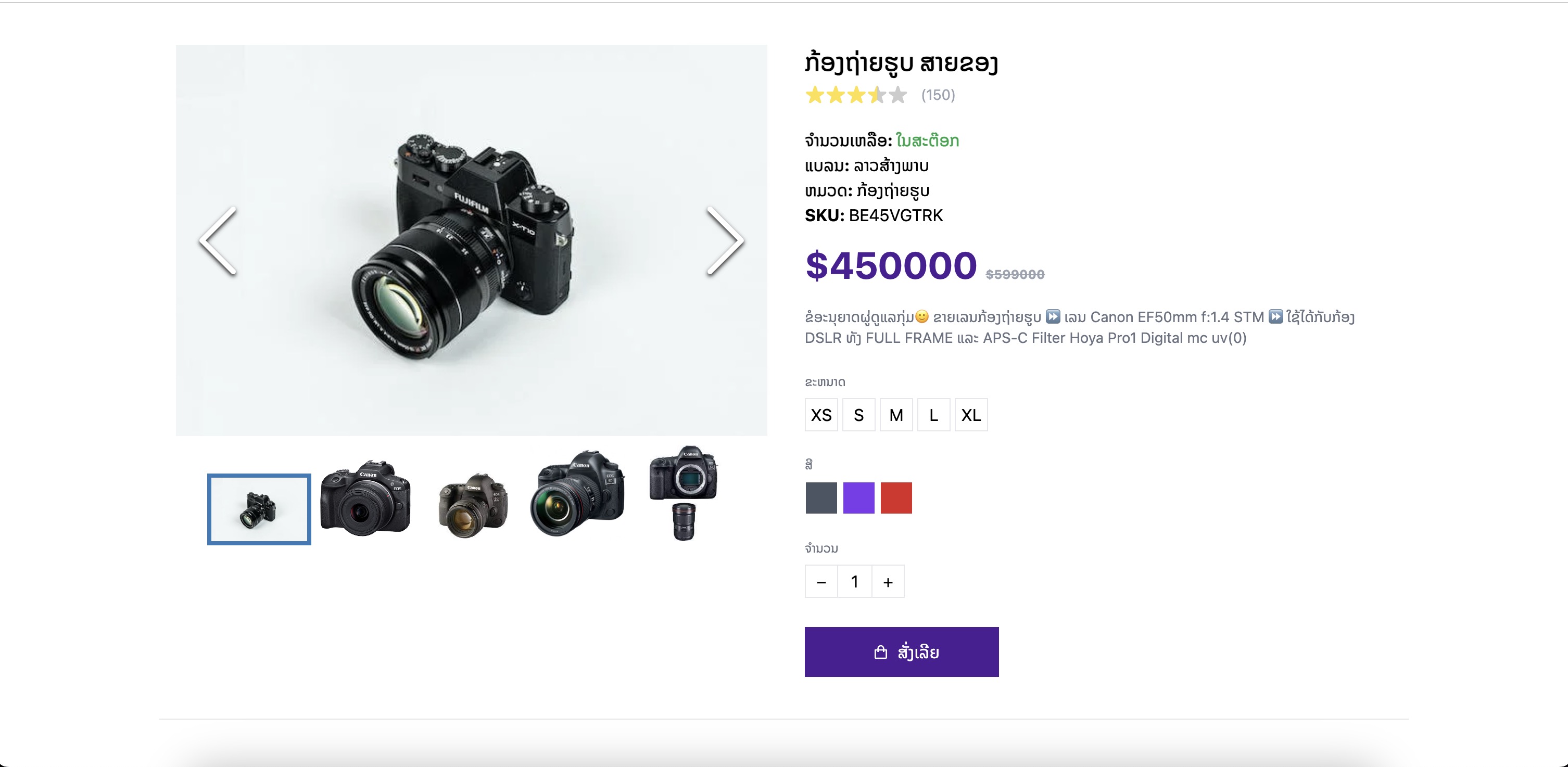
ວິທີການທົດລອງໃຊ້ລະບົບທົດລອງນີ້
- ກົດສັ່ງຊື້ ແລ້ວລະບົບຈະສ້າງ QR ສຳລັບຈ່າຍເງິນຂຶ້ນມາ
- ໃຊ້ແອັບທະນາຄານ BCEL One ຊຳລະ QR ດັ່ງກ່າວ
- ຖ້າສຳເລັດ ຈະມີຂໍ້ມູນທີ່ສົ່ງມາຈາກທະນາຄານສະແດງຢູ່ໜ້າຈໍ
ອັບເດດຫຼ້າສຸດ: 11 ເດືອນກ່ອນ